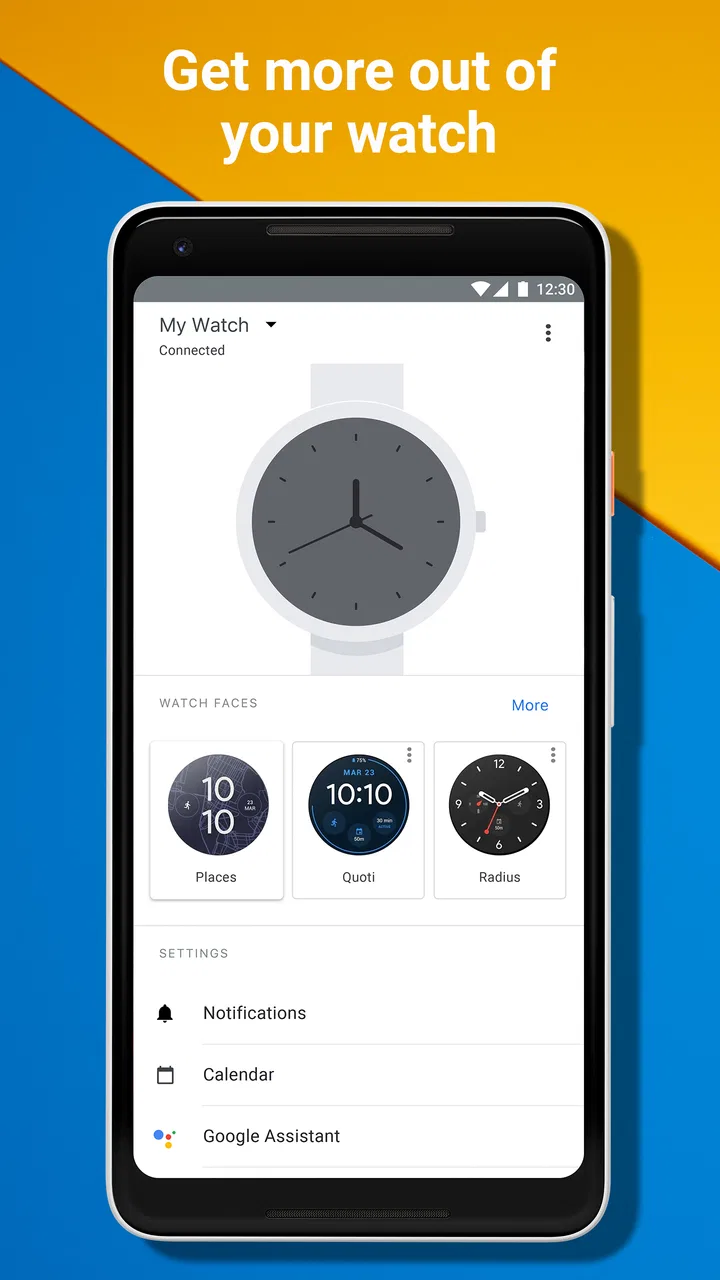
Wear OS by Google Smartwatch
- 3.7
- Rating
- 100.00M
- Installs
- Free
- Price

 Analysis by App-foxy
I spent time with Wear OS by Google as the companion app for a Wear OS smartwatch, and my first impression is that its value depends less on the phone app itself than on how well it keeps the watch and phone working together. It is a free communication app from Google LLC, aimed at people who want to manage a compatible smartwatch from an Android phone. That sounds simple, but the day-to-day experience is really about reducing small points of friction: pairing the devices, keeping their connection organized, and making the watch feel like part of the phone rather than a separate gadget.
The app has been around since Jul 2, 2014, when it was known as Android Wear. That history matters because this is not a brand-new companion utility trying to define the smartwatch category from scratch. It is the phone-side hub for Google’s Wear OS ecosystem, and its job is mainly practical. I would not install it expecting a full messaging client, a standalone health platform, or a replacement for every watch-specific application. I would install it because I own, or plan to use, a Wear OS watch and need the official bridge between the two devices.
How Wear OS fits into everyday smartwatch use
In ordinary use, the app sits in the background of a relationship between two screens. The phone remains the place where I handle longer tasks, while the watch provides quick access to information and actions on my wrist. The companion app helps establish that relationship and gives the phone a central place for smartwatch-related management. That division is important: the app is most useful when I treat it as a control point, not as the main destination for everything I do with the watch.
You May Also Like

 Pandora - Music & Podcasts
Pandora’s Music Is Easy to Start, but Harder to Recover
Pandora’s strength is its low-effort path from a seed to a station. Its weak spot is how much confidence it asks you to place in connection, setup, and quiet recovery.

 8 Ball Pool
 Is Built on Rivalries, Rematches, and Routine
A close look at the rivalries, rematches, shared routines, and unanswered safety questions that turn a quick pool match into a persistent mobile community.

 Samsung Music
’s Quiet Strength Is Playing What You Already Own
Its reach comes less from spectacle than from dependable access to a personal library. That simplicity is both the app’s strongest retention engine and its ceiling.

 AccuWeather: Weather Radar
AccuWeather Review: A Quick, Clear Forecast for Everyday Decisions
For everyday plans, the best forecast is the one you can understand quickly. AccuWeather makes rain timing, radar, and local conditions easy to act on, with a few trade-offs.

 Hill Climb Racing
Why Hill Climb Racing Still Turns Crashes Into One More Run
A tiny car, a bumpy hill and one more upgrade: Hill Climb Racing keeps resurfacing because its simple chaos makes every near-miss feel personal.

 AliExpress - Shopping App
AliExpress Makes Global Shopping Feel Personal, but Shoppers Bear the Risk
AliExpress turns a global marketplace into a pocket-sized discovery engine. Its reach is useful, its shopping loop compelling, and its trade-offs easy to miss.
More From Our News Desk
View All News


A realistic example is a busy morning. I can leave the phone in a bag while moving around the house, then glance at the watch when a notification arrives. Later, when I need to adjust the watch’s setup or check how the phone and watch are connected, the companion app becomes more relevant. The benefit is not one dramatic feature; it is the cumulative convenience of having the watch behave as an extension of the phone.
That makes the app particularly relevant in the communication category. The communication label should not be interpreted as meaning that the app is itself a social network or a dedicated chat service. Its role is to support communication through the connected smartwatch. If your priority is sending long messages, organizing conversations, or making detailed calls from a large screen, the phone will remain more comfortable. If your priority is noticing something quickly without reaching for the phone, the watch-and-companion setup makes more sense.
The app’s store summary describes it as a way to sync a smartwatch and phone, and that is the most useful mental model I found. It is the connective layer. The watch is the visible accessory, the phone supplies much of the familiar environment, and the companion app helps them operate as one setup. That also explains why the experience can feel invisible when everything is working properly: a good companion app often succeeds by preventing the user from thinking about it.
What the free price really means
Wear OS by Google is free to install. That gives it an immediate advantage over a paid companion utility because there is no app purchase standing between a user and the basic phone-side software needed for a compatible watch. For someone who already owns the relevant hardware, the app does not add a separate software charge to the setup.
Still, “free” should be read carefully. The app’s free access does not turn a smartwatch into a no-cost product. The watch itself is a separate purchase, and the practical value of the app depends on having compatible hardware to connect to. I see the app as an included access point to the Wear OS experience rather than a complete product that delivers its full value on a phone by itself.
That distinction is useful when comparing it with alternatives. A phone-only communication app can often be used without a watch, while this one is tied to the smartwatch relationship. On the other hand, if I already have a Wear OS watch, the free app is a sensible part of the ownership experience. I am not paying for a duplicate messaging service; I am getting the official companion layer from Google LLC.
The app is rated for Everyone, which fits its basic purpose. Pairing and managing a smartwatch can still feel technical to someone who rarely changes device settings, but the intended use is broad rather than restricted to a specialist audience. The large audience is reflected in its reach: it has passed 100 million installs, with an average rating of 3.7. Those figures suggest a widely used utility with a mixed but respectable reception, not an app that everyone finds flawless.
Where the app delivers practical value
The strongest value comes from centralization. Instead of treating the watch as an isolated accessory, I can use the companion app as the phone-side place to think about the connection. That is especially helpful during initial setup, when the watch needs to become familiar with the phone and the user needs a clear path into the Wear OS environment.
Another useful point is continuity. When a smartwatch is used throughout the day, small interruptions matter: a connection that needs attention, a setting that is hard to locate, or uncertainty about which device is responsible for an action. A dedicated companion app gives those questions a natural home. It does not eliminate every problem, but it makes the watch relationship easier to understand than relying on scattered phone menus alone.
I also appreciate the way the app supports a glance-first workflow. A smartwatch is valuable when it saves me from repeatedly pulling out my phone for minor checks. The companion app does not replace the watch’s screen, but it helps make that screen relevant to the phone’s communication flow. For quick awareness, that can be more convenient than opening a full phone application each time.
One less obvious benefit is troubleshooting discipline. When something feels wrong, I can separate the problem into two parts: is the phone-side connection behaving correctly, or is the watch itself the source of the issue? That simple distinction prevents random changes. I would first inspect the companion relationship, then test the watch, rather than immediately resetting everything. For people who are comfortable with connected devices but dislike guesswork, that is a worthwhile habit.
The app is also useful for households where a smartwatch is not worn constantly. If I put the watch aside for a few days and return to it later, the companion app provides a more natural starting point than trying to remember every step from the original setup. This is a modest advantage, but it matters because wearable technology often fails to become a habit when reconnecting feels harder than simply leaving the device unused.
Tradeoffs I noticed during use
The main limitation is dependency. This is not an independent communication tool that makes sense for every phone user. Without a compatible Wear OS smartwatch, much of its purpose disappears. That makes it a poor recommendation for someone who only wants a general notification manager, a chat app, or a way to organize contacts.
The second tradeoff is that the app cannot make the entire smartwatch experience equally simple. The phone, watch, operating system, and individual watch model all contribute to what happens after installation. The companion app can be the right starting point, but it is not a magic layer that removes every difference between watches. If a buyer expects one universal interface with identical behavior on every device, disappointment is possible.
I also found that the value is indirect. The app may not feel exciting when opened on its own because its purpose is to support another device. That can make it seem underwhelming compared with a standalone communication app that gives immediate access to conversations or calls. Its success is measured by how smoothly the watch participates in daily life, not by how much time I spend browsing inside the app.
The rating of 3.7 from around 291 thousand ratings reflects that mixed reality. Many people clearly find the app useful enough to keep using, while others encounter friction in the relationship between phone and watch. I would not treat the rating as a verdict that the app is bad. I would treat it as a reminder that companion software is sensitive to setup, device compatibility, and expectations.
A practical tip is to avoid judging the app after only one quick launch. The meaningful test is whether it helps your actual routine: receiving relevant communication on the wrist, returning to the watch after time away, and finding the phone-side controls when you need them. If those tasks are not part of your day, the app will naturally feel unnecessary no matter how well it performs.
Who will get the most value
I would recommend Wear OS by Google first to someone who already owns a Wear OS smartwatch and wants the official way to connect it with a phone. It is also a reasonable choice for a person deciding whether a smartwatch can reduce phone checking during work, commuting, household tasks, or exercise. The benefit is strongest when quick awareness matters more than writing long responses.
It can be especially useful for users who want a clear separation between phone tasks and wrist tasks. I might use the phone for detailed communication, then rely on the watch for brief checks. That workflow reduces interruptions without pretending that a small watch display is a full replacement for a phone.
People who frequently change how they use their watch may also appreciate having a dedicated companion layer. For example, someone who alternates between wearing the watch at work and leaving it at home can use the app as the familiar phone-side entry point whenever the wearable returns to the routine. The advantage is not advanced customization for its own sake; it is having a consistent place to begin.
I would skip it if I do not own a Wear OS watch, if I want a standalone messaging experience, or if I am looking for a companion app for a different smartwatch platform. In those cases, installing it would add little value and could create confusion about which ecosystem is responsible for the device. I would also look elsewhere if my priority is deep phone-based communication management rather than watch synchronization.
How it compares with usual alternatives
The most obvious alternative is using the phone without a smartwatch companion at all. That approach is cheaper in hardware terms and simpler for people who are comfortable checking the phone directly. It also avoids the extra layer of pairing and wearable management. The tradeoff is that every check requires reaching for the phone, which can be inconvenient when it is out of reach or when I want to stay focused.
Another alternative is the companion app made for a different smartwatch ecosystem. Those apps may be a better fit when the watch is not based on Wear OS, because they are built around their own hardware and software relationship. Choosing between them is less about which app looks best in isolation and more about matching the phone app to the watch already on your wrist. In that sense, Wear OS by Google is a strong ecosystem choice but not a universal smartwatch manager.
Compared with a dedicated messaging application, this app is narrower but more structural. A chat app gives me conversations directly; Wear OS by Google helps make communication available through a connected watch. If I need rich conversation tools, I would choose the messaging app. If I need the watch and phone to cooperate, this companion app is the more relevant tool.
That difference also affects expectations around time spent in the app. I would not compare it with a social platform by asking which one offers more content. I would compare it with other device companion apps by asking which one makes the hardware relationship less troublesome. On that measure, its official position in the Wear OS ecosystem is its main advantage.
Small workflow choices that improve the experience
My first recommendation is to think about the watch before changing settings in the app. Decide which tasks genuinely belong on the wrist and which should stay on the phone. That prevents the common mistake of trying to recreate the entire phone experience on a much smaller screen.
Second, use the app as a checkpoint when the watch feels disconnected rather than immediately assuming the hardware has failed. Check the phone-side relationship, then test a simple everyday action. This approach is less disruptive than making several changes at once, and it helps identify whether the problem is with the connection or with a particular watch behavior.
Third, revisit the setup after a week of real use. The first day encourages experimentation, but the best arrangement becomes clearer after commuting, working, relaxing, and handling ordinary interruptions. I would keep only the watch interactions that save time. A smartwatch becomes less useful when every minor phone event demands attention on the wrist.
Finally, remember that the free app is not the same as free ownership. Before choosing the Wear OS route, I would decide whether the convenience of wrist-based access justifies buying and wearing a compatible watch. Once that decision is already made, the app’s lack of a separate charge becomes a meaningful advantage. Before that decision, it is only one part of the total cost and commitment.
My final recommendation
Wear OS by Google is a practical companion app rather than a destination app, and that is both its strength and its limitation. It helps connect a Wear OS smartwatch with a phone, supports a more glanceable communication routine, and gives owners a natural phone-side starting point for their wearable. Its free price makes it easy to try when the required hardware is already available, while its Everyone age rating keeps the basic audience broad.
I would recommend it to Wear OS watch owners who want the official bridge between their devices and who value quick information without constantly holding the phone. I would not recommend installing it merely because it is popular or because its category says communication. Without the right smartwatch, the app has little reason to exist, and people seeking a full messaging platform should choose a tool designed for that job.
After weighing the free access against the hardware dependency, my verdict is straightforward: use it when you are committed to the Wear OS watch-and-phone experience, and skip it when you are not. It delivers real value by making that relationship possible and manageable, but it cannot create value outside the ecosystem. For the right owner, it is an important piece of the setup; for everyone else, it is simply the wrong kind of app.
Wear OS by Google remains a sensible choice for its intended audience because it focuses on the connection that makes a smartwatch useful. It is not perfect, and the mixed reception shows that the experience can involve friction, but I would still keep it installed on a phone paired with a Wear OS watch. In that specific situation, the app earns its place by turning a separate wearable into a more natural extension of everyday communication.
FAQs for Wear OS by Google Smartwatch
01Is Wear OS compatible with all smartphones?
Wear OS by Google is compatible with both Android and iOS devices, but functionality can vary. To get the best experience, it's recommended to use a phone running Android 6.0+ with Google Mobile Services. While it does work with iPhones, features like Google Assistant and app notifications are more limited.
02What apps are available on Wear OS?
Wear OS supports a wide range of apps, including fitness trackers, music streaming, and messaging apps. Google Play Store on Wear OS offers popular apps like Google Fit, Spotify, and WhatsApp. However, the availability of some apps may vary based on your region and device compatibility.
03How does Wear OS handle notifications?
Wear OS delivers notifications directly to your smartwatch, mirroring those on your smartphone. You can read, respond, and dismiss notifications right from your wrist. The system also allows for customizable vibration patterns and the ability to prioritize certain apps, ensuring you don't miss important alerts.
04What are the main features of Wear OS?
Wear OS offers features such as customizable watch faces, Google Assistant integration, Google Pay for contactless payments, and fitness tracking via Google Fit. These features enhance the smartwatch's functionality, making it a versatile companion for everyday tasks and fitness activities.
05How is the battery life on Wear OS devices?
Battery life on Wear OS devices can vary significantly depending on usage and the specific model. On average, most Wear OS smartwatches last about one to two days on a single charge. Features like GPS, always-on display, and extensive app use can drain the battery faster, so managing settings is key.
Pros
- Seamless integration with Android devices.
- Wide range of customizable watch faces.
- Supports Google Assistant for voice commands.
- Tracks health metrics like heart rate and steps.
- Access to a variety of third-party apps.
Cons
- Battery life can be limited with heavy use.
- Requires frequent updates for optimal performance.
- Some features need a constant internet connection.
- Limited app selection compared to phone versions.
- Can be slow on older smartwatch models.

Wear OS by Google Smartwatch
Gallery